


Nov 13, 2017

Nov 12, 2017
Nov 10, 2017
Nov 6, 2017
Jul 15, 2017
Open Notepad Continue in Your Computer
This Notepad trick to play with your Computer System of Friends Computer would be to set off a command which would open his/her notepad repetitively.
Open Notepad and Type (Copy & Paste) this code.@ECHO off
:top
START %SystemRoot%\system32\notepad.exe
GOTO top
and Open this file and see Magic.
This file send through mail your friend and say open.
Enjoy.
Fake Windows Errors With Notepad (Windows_XP)
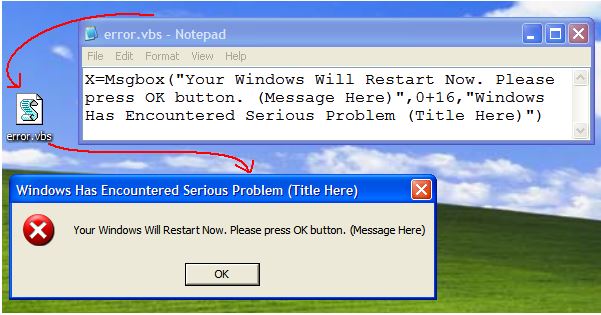
You can create Fake error message . To do this, follow these steps:
- Open Notepad
- Type X=Msgbox(“Message Here”,0+16,”Title Here”)
- Replace Message Here and Title Here with your Error Message and Error-Window Title respectively.
- Save the file with error.vbs.
- Now, click the file and you’ll get your custom-made Windows error message.
Forcefully Shutdown Windows
This trick will let you force shutdown your Windows in a single-click.
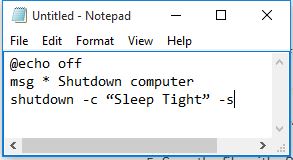
- Open Notepad
- Paste @echo off in first line.
- Paste msg * Shutdown computer in second line.
- Paste shutdown -c “Sleep Tight” -s in third line
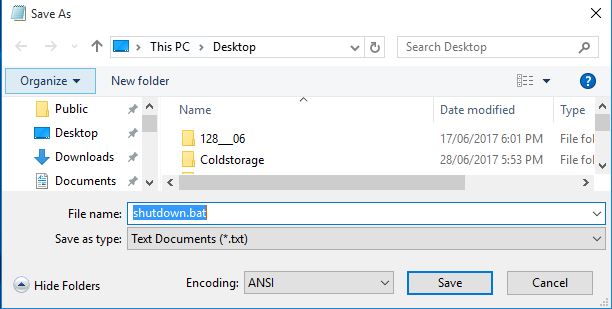
- Save the file with .BAT extension. For example, shutdown.bat
- Click on your file and it will automatically shutdown your Windows.
Subscribe to:
Posts (Atom)
